
How to Set Up a Garry's Mod Server: Gamemode, Workshop and Admins
A Garry's Mod server does very little until you decide what it plays. This guide goes through the choices in the order that matters: gamemode and map, Workshop content, how the server appears in the server browser, and admin rights.
On this page (7 sections)
On NEXUS these live on three pages of the Game Hosting Panel: Game settings, Add-ons and Players. The first time you open a new server, a guided setup asks the same questions; you can skip it and use the pages below at any time.
Pick a gamemode
Open Game settings. The What to play section lists the gamemodes On your server (Sandbox and Trouble in Terrorist Town come with the game) and a set you can Install with one click, including TTT2, Murder, Prop Hunt, Zombie Survival, Cinema, Helix HL2RP and roleplay themes built on DarkRP. Select one, save, and it is used the next time the server starts.
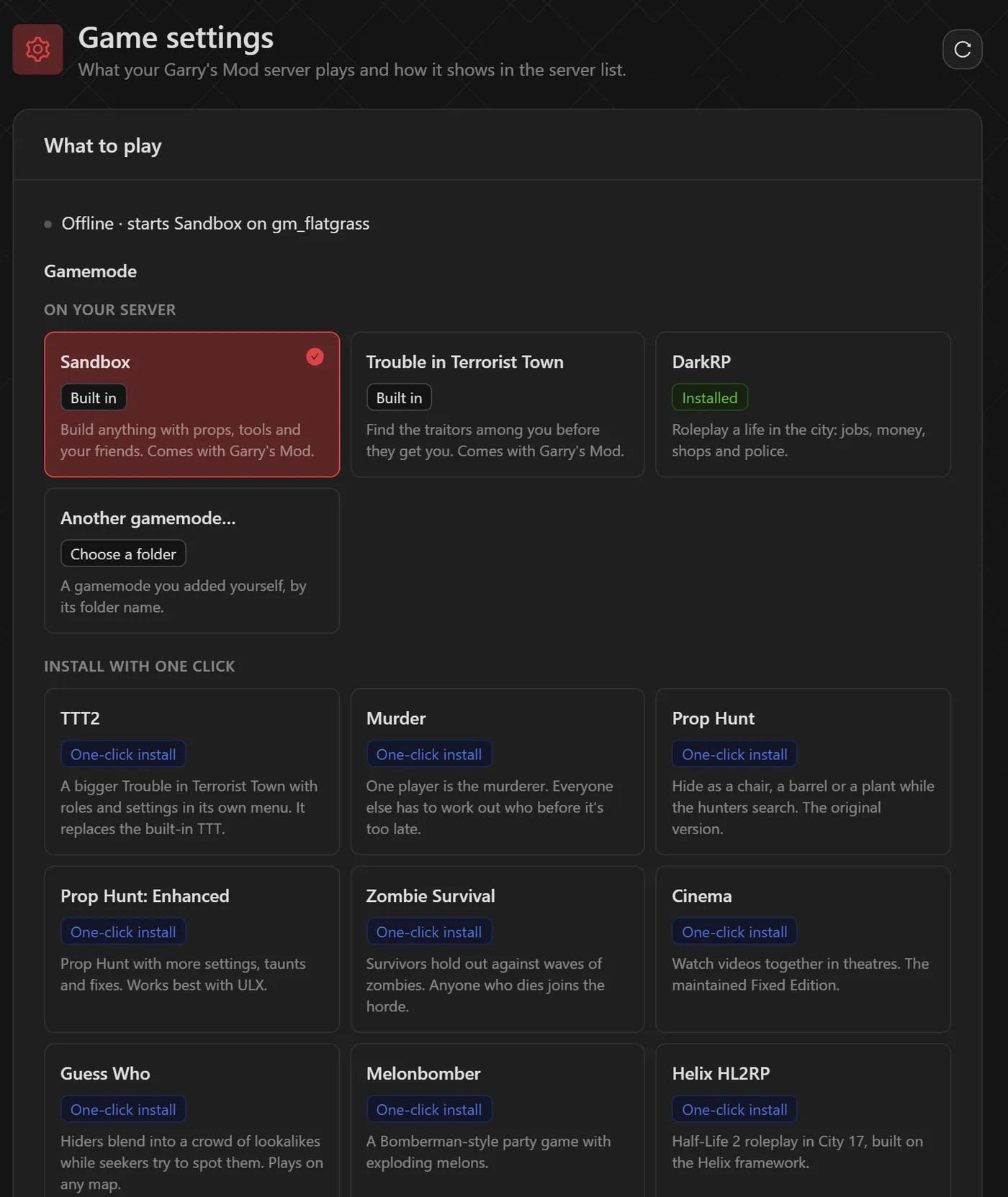
- If you uploaded a gamemode yourself, choose Another gamemode and enter its folder name from
garrysmod/gamemodes. - Gamemodes expect their own kind of map. By convention, TTT maps start with
ttt_, DarkRP maps withrp_and Prop Hunt maps withph_. Sandbox works on anything. - One-click gamemodes you no longer want are listed under Installed with one click, with a Remove button.
Choose the starting map and player slots
Below the gamemodes, Starting map is a list of the maps on your server, and Player slots sets how many people can be on at once. Both apply at the next start.
- To add a map, either add it from the Steam Workshop on the Add-ons page (next section) or upload the
.bspfile togarrysmod/mapswith Files. Refer to it without the.bspextension. - To switch maps while the server is running, type
changelevel mapnamein the Console. The starting map is what the server loads after a restart.
Server name, password and the Steam token
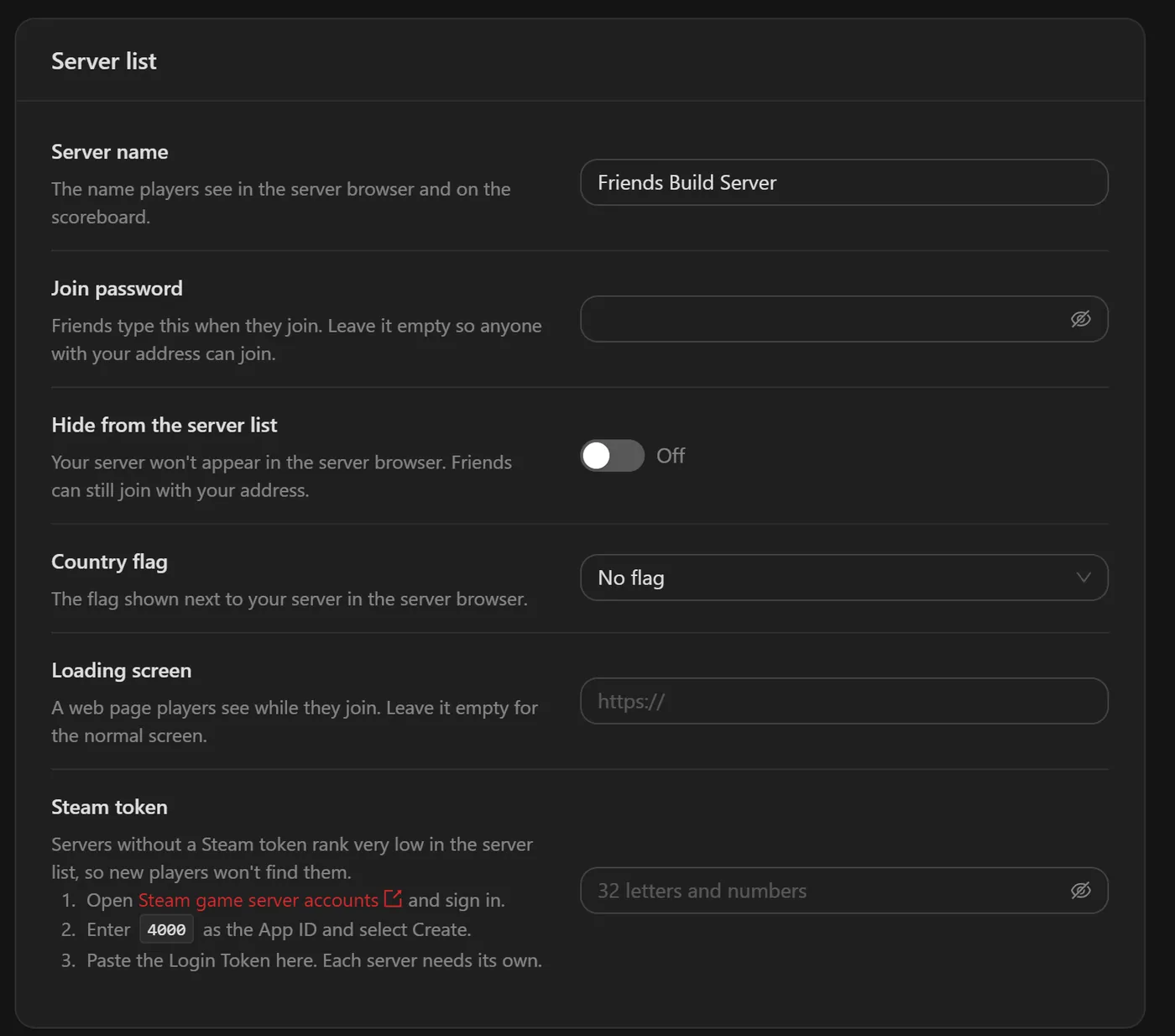
The Server list section of Game settings controls how players find you:
Server name- Shown in the server browser and on the scoreboard. In
server.cfgthis ishostname. Join password- Friends type it when they join. Leave it empty so anyone with your address can join. In
server.cfgthis issv_password. Hide from the server list- Keeps the server out of the browser; friends can still join with your address.
Country flag- The flag shown next to your server in the browser.
Loading screen- A web page players see while they join (
sv_loadingurl). Leave it empty for the normal screen. Steam token- A Game Server Login Token. Without one, the panel notes, your server ranks very low in the server list.
- Sign in to Steam game server account management.
- Enter
4000as the App ID (Garry's Mod) and create the token. Each server needs its own. - Paste the Login Token into Steam token and save. Until you do, Home shows "Hard to find in the server list" next to your gamemode, and 1 thing to fix under the start button opens Server health with an Add a Steam token item.
Add Workshop add-ons, maps and content
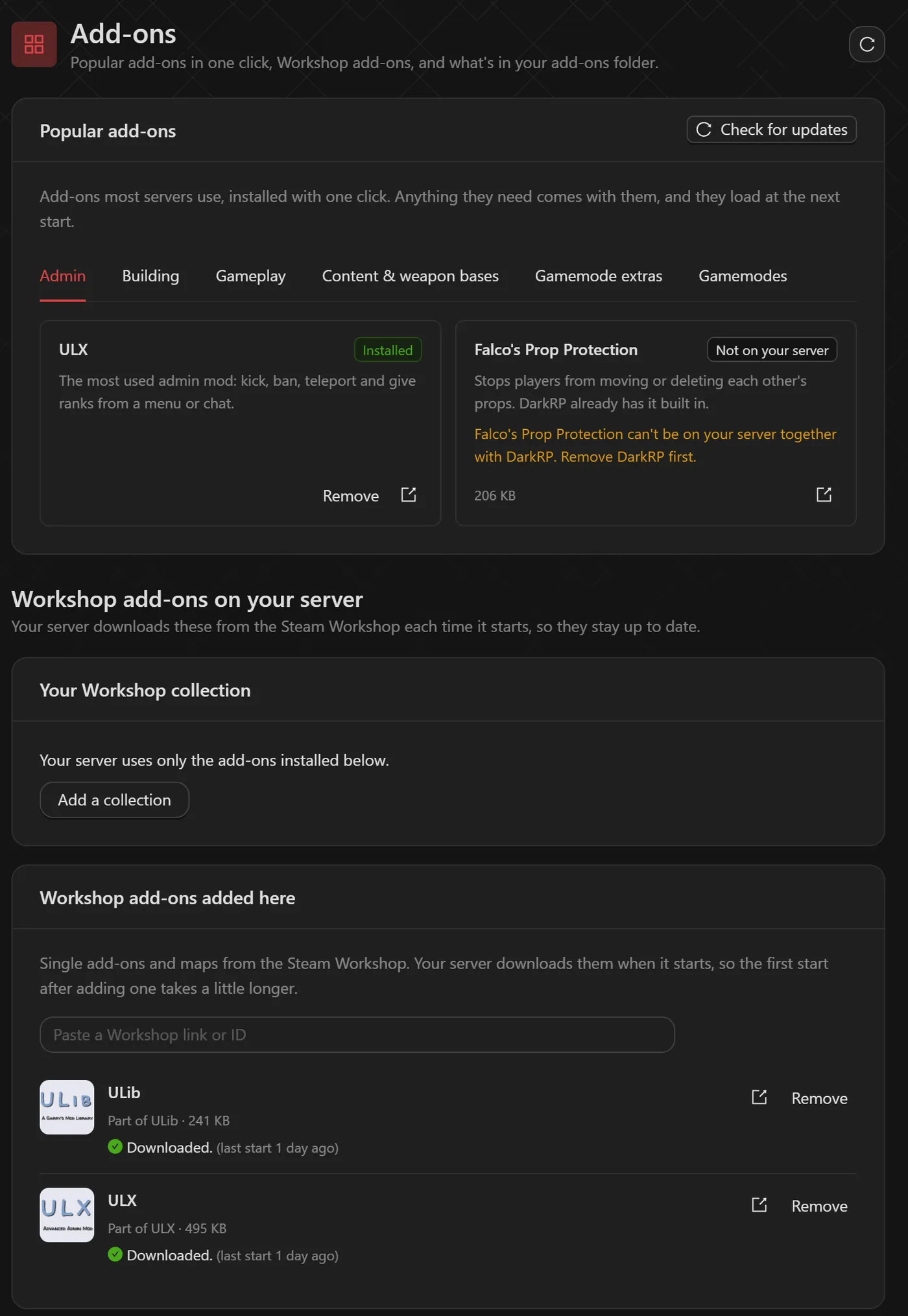
Open Add-ons. It has three parts:
- Popular add-ons: common add-ons grouped as Admin, Building, Gameplay, Content & weapon bases, Gamemode extras and Gamemodes. They install with one click, bring anything they need with them, and load at the next start. Check for updates refreshes them.
- Workshop add-ons on your server: under Your Workshop collection, click Add a collection and paste a Steam Workshop collection link. Under Workshop add-ons added here, paste the link or ID of a single add-on or map. The server downloads these from the Workshop each time it starts, so they stay up to date.
- Installed in the add-ons folder: everything in
garrysmod/addons, including anything you upload with Upload add-on. Turn off stops an add-on loading without deleting it.
The Advanced view (Advanced tools at the bottom of the sidebar) adds Install from GitHub for add-ons and gamemodes that are not in Popular add-ons or on the Steam Workshop, Workshop search, and a list of everything Nexus manages on your server.
Why a collection matters to players
When players join, Garry's Mod downloads the server's Workshop content for them. Add-ons you upload straight into the add-ons folder are not sent that way, which is why players see ERROR models and purple-and-black textures. As the panel notes, players only get models and textures you share through your Workshop collection or a fast download address. The simplest fix is to put everything with models, materials or maps into your collection.
Tip: Big collections make each player's first join slower. Keep the collection to what the server actually uses.
Make yourself admin
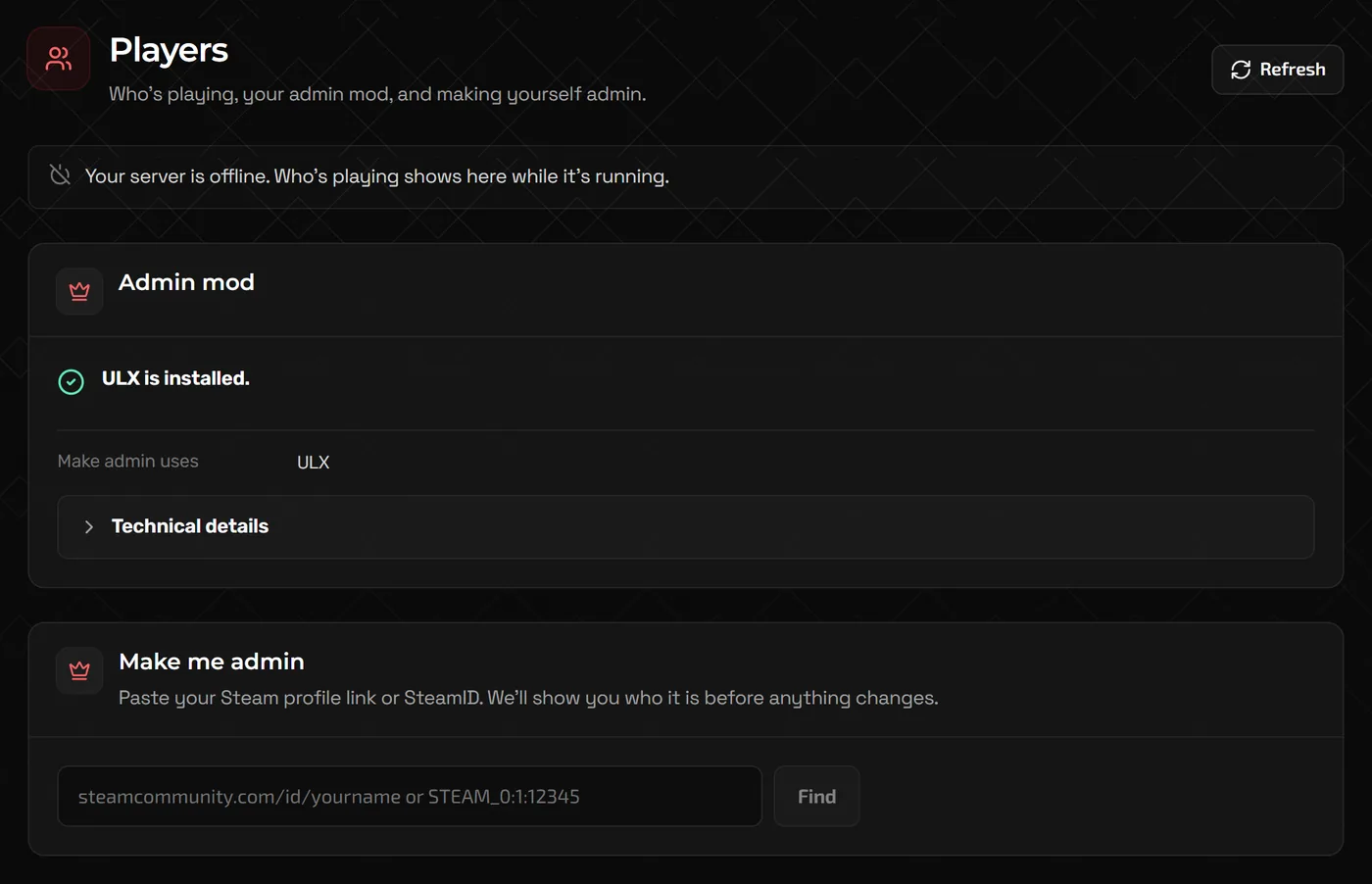
Garry's Mod needs an admin add-on for proper admin tools. ULX (with ULib) is the most common and is under Popular add-ons, Admin. Once it is installed, Players confirms it under Admin mod.
- Open Players and paste your Steam profile link or SteamID (for example
STEAM_0:1:12345) into Make me admin. - Click Find. The panel shows who the account belongs to before anything changes. Pick a Rank (Superadmin for full control, or Admin) and click the button that makes you one. If the server is off, it can do it at the next start instead.
- Join the server and type
!menuin chat to open the ULX menu.
!kick PlayerName reason
!ban PlayerName 60 reason          minutes; 0 bans permanently
!goto PlayerName
!bring PlayerName

ulx adduser "PlayerName" superadmin              in the server console, player online
ulx adduserid STEAM_0:1:12345 admin              by SteamID, player offline
Sandbox building rules
For Sandbox, the Building rules section starts from a preset (Build with friends, Sandbox PvP or Public build server) and lets you adjust each rule. These map to standard Sandbox ConVars:
Noclip (sbox_noclip)- Lets players fly through walls. In Sandbox this also applies to admins unless an admin add-on like ULX allows them.
Nobody takes damage (sbox_godmode)- Everyone is invulnerable. Good for peaceful building.
Players can hurt each other (sbox_playershurtplayers)- Turn off to stop player-versus-player damage.
Spawn with weapons (sbox_weapons)- Off leaves only the physics gun, tool gun and camera.
Props, ragdolls, NPCs and vehicles per player (sbox_maxprops and similar)- Spawn limits. Lower prop limits on public servers keep lag and abuse down.
FAQ
Can I still edit server.cfg?
Yes, it is at garrysmod/cfg/server.cfg in Files. For settings that Game settings also controls, such as the server name and password, use Game settings so the two do not disagree.
How do I change the tickrate?
Switch to the Advanced view (Advanced tools at the bottom of the sidebar): on Game settings, Tickrate sits with Starting map and Player slots, and it is on Startup too. Higher tickrates make movement and physics feel more responsive but use more CPU, so raise it gradually.
Why can't my friends find the server in the browser?
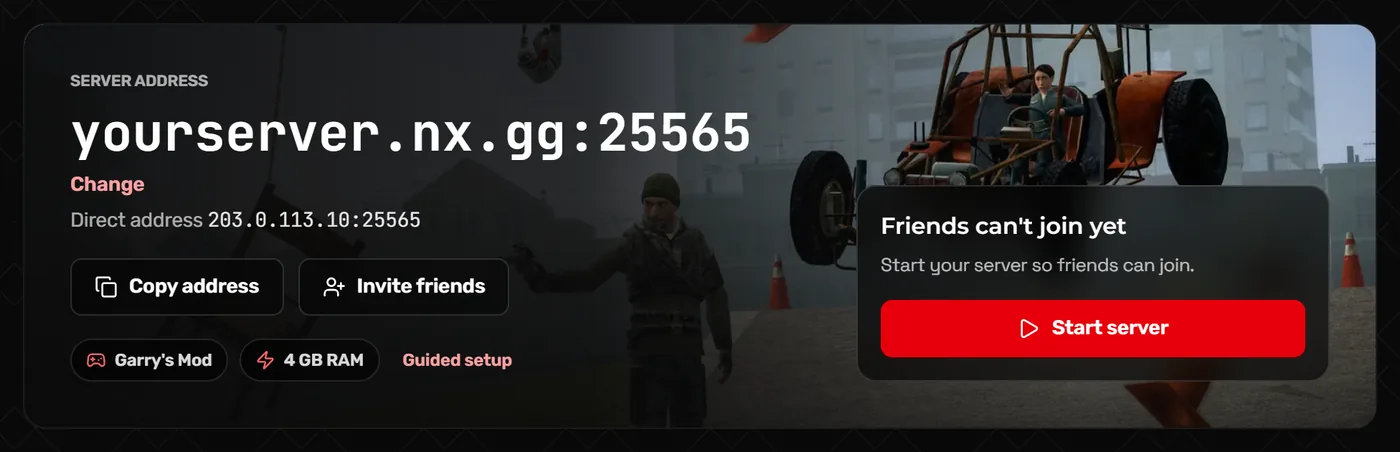
Add a Steam token, check Hide from the server list is off, and search for the exact server name. Friends can always join from the console with connect followed by the address on the Home page.
Is DarkRP available?
Yes. DarkRP and roleplay themes built on it are one-click installs under What to play on Game settings.
Related guides
How to Move Your Game Server to NEXUS (Free Migration or Do It Yourself)
The free staff migration, the Server Importer, SFTP and world uploads, with what to copy for Minecraft, Valheim, Palworld and more.
Rust Server Admin Commands and Setup Guide
server.cfg basics, ownerid and moderatorid, everyday admin commands, Oxide and Carbon plugins, and how wipes work.
How to Make a Minecraft Server to Play With Friends
Java or Bedrock, how much RAM you need, the server.properties settings that matter, ops and whitelists, and how friends connect.